Enterprise
For teams bringing intelligence into organizational investigations and defense.
- IOFA Feeds and advanced investigation.
- APIs, enrichment and exports according to your subscription.
- Monitoring and automation in existing workflows.


SILENT PUSH × CYBERLION | PREEMPTIVE CYBER DEFENSE
Silent Push helps security teams uncover malicious infrastructure, identify early signs of hostile activity and understand the connections between digital assets — so they can act earlier.
Early intelligence. Wider context. A clear path to action.
The starting point. Investigate its infrastructure and the assets connected to it.
Choose a node to reveal its context
ILLUSTRATION · FICTIONAL DATA
From one indicator to a wider picture
Choose a stage to see how separate signals become an investigation your team can act on.
A domain or IP is the starting point. Look for infrastructure that may be associated with hostile activity.
DNS, WHOIS, certificates and web content reveal connections that a single-asset lookup can miss.
Compare findings with the ways threat actors manage their infrastructure, then decide which connections need deeper investigation.
Move indicators and context into investigation, monitoring or defensive workflows through feeds and APIs, according to your organization’s policy.
This illustration explains a possible workflow. It is not a live scan or a result from a customer environment.
Traditional intelligence often starts with infrastructure already observed in malicious activity. Silent Push also lets teams investigate how threat actors build and manage their infrastructure, helping surface relevant assets earlier.
REAL PRODUCT VIEW · LIGHT MODE
Total View brings asset context together: DNS records, registration details, certificates and threat-feed history. Choose an area of the screen to understand what you are seeing.
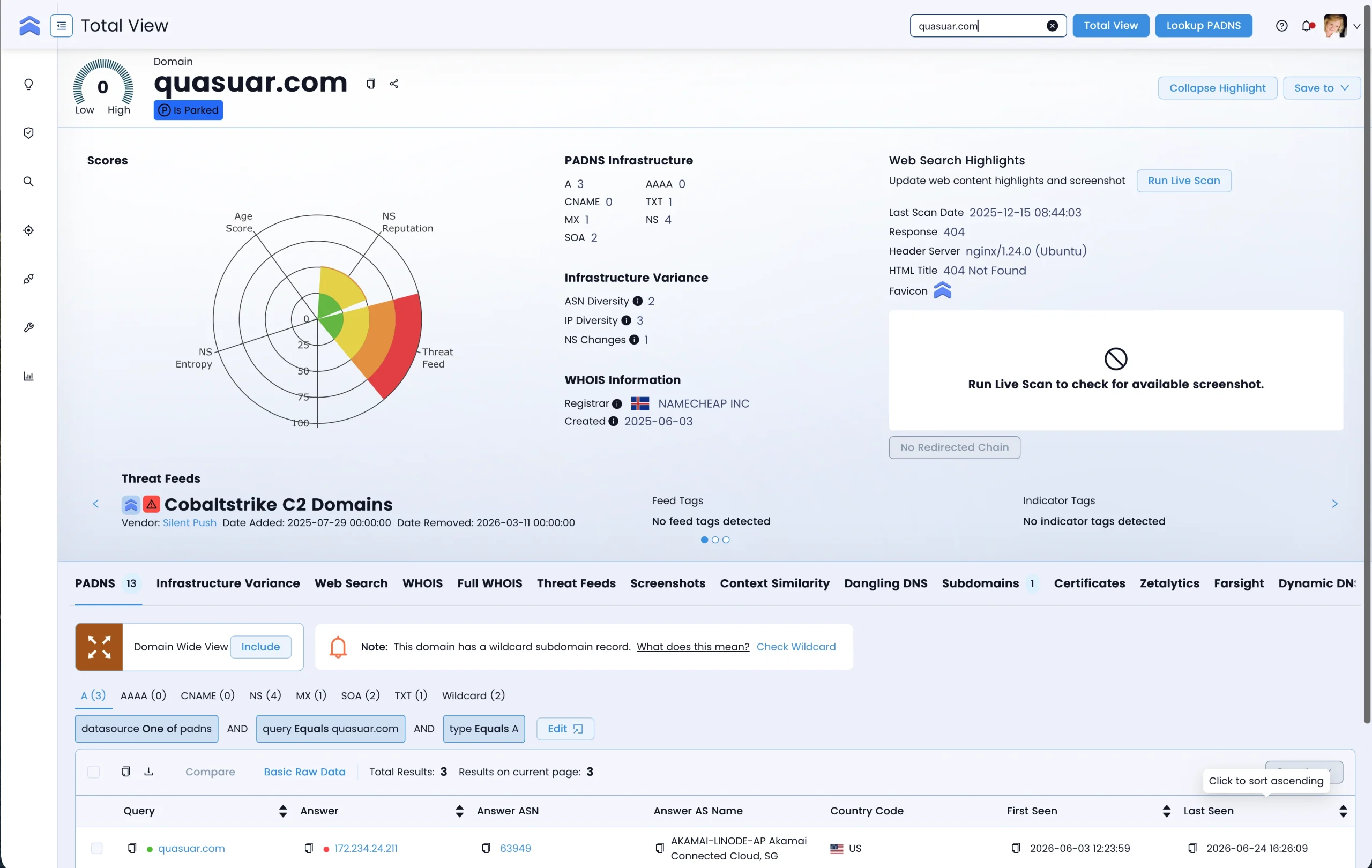
Official Silent Push documentation screenshot: an example of Total View in Light Mode. The highlights here are explanatory overlays, not part of the product interface.
Asset details, registration history and infrastructure characteristics appear in the same view.
Mobile shows a focused area. Open the full screenshot to inspect the details.
View the vendor documentationONE PLATFORM. CONNECTED WORKFLOWS.
Indicators of Future Attack — IOFA™ are domains and IP addresses identified as part of threat-actor infrastructure during preparation. This intelligence capability sits within the platform and helps teams assess earlier defensive action.
Four work areas support different stages of an investigation. Choose one to explore its capabilities.
Search and enrich indicators, review assets and run live scans when needed.
Explore the capabilitiesValidate indicators, explore intelligence feeds and move findings to your tools and teams.
Explore the capabilitiesSearches, queries and pivots reveal relationships and activity patterns over time.
Explore the capabilitiesAdditional attribution and context capabilities help examine traffic origins and infrastructure connections.
Explore the capabilitiesThese are work areas and capabilities in one platform, not four separate products. Data coverage and access depend on your plan and permissions.
01 / THREAT HUNTING
Combine DNS, WHOIS, certificates and content to build fingerprints and search for other assets with similar characteristics. An investigation can grow from one indicator into a wider infrastructure picture.
ILLUSTRATION · FICTIONAL DATA
ILLUSTRATION · FICTIONAL DATA
02 / BRAND PROTECTION
Find lookalike domains, typosquatting and copied digital assets. Monitoring your DNS and public assets helps track impersonation, campaigns and changes that need review.
A similar name is not proof of malicious activity. Assess the content, registration and infrastructure together.
WHAT DOES YOUR TEAM NEED TO FIND?
The platform supports your organization’s decisions. It does not guarantee detection or prevention of every attack.
03 / AUTOMATED INTELLIGENCE
IOFA Feeds and APIs deliver indicators and context to SIEM, SOAR and TIP workflows, enriching alerts and connecting findings to the tools your team already uses.
SILENT PUSH · ILLUSTRATIVE FEED
portal.exampleContext attached192.0.2.24Team reviewIllustrative workflow, without a live connection. Integrations, export formats and automated actions depend on your tools, licensing and organizational policy.
For teams bringing intelligence into organizational investigations and defense.
Free introductory access to Silent Push data and investigation tools.
Registration opens on Silent Push’s website. Access is subject to the vendor’s terms.
THE CYBERLION PERSPECTIVE
Together, we examine what you need to discover, which data is missing from your current workflow and how to assess Silent Push for your environment and team.
CTI, incident investigation, brand protection or security-stack enrichment.
Prioritize the questions and workflows your team needs to see.
Help customers and partners evaluate the capabilities and technical fit.
SILENT PUSH × CYBERLION
Explore how Silent Push can fit into your organization’s threat intelligence and defense strategy.